

DROID ACADEMY (E-32) Robotics Course
(Senior Track)
What is Electricity?
Big idea: Electricity is the movement of electrons. Computers — including the ESP32 brain inside E-32 — use that movement as billions of tiny ON/OFF switches to think, remember, and control motors and sensors.
1. Atoms and Electrons
Everything in the universe — you, the table, the air, the stars — is made of incredibly tiny building blocks called atoms.
Each atom looks a bit like a mini solar system:
In the centre is the nucleus, made of protons (positive charge) and neutrons (no charge).
Zooming around it are electrons — tiny particles with a negative charge.
In some materials — especially metals like copper — the outer electrons are only loosely attached to their atoms. They can be pushed from one atom to the next, like a giant game of tag along a wire.
Electric current is simply a moving crowd of electrons.
When electrons flow, they create an invisible electromagnetic field around the wire, and that field pushes even more electrons along. That chain reaction is what we call electricity.
Did you know? Electrons follow quantum rules. They can behave like tiny waves and like tiny balls at the same time, and can even exist in more than one place until we measure them. This “quantum weirdness” is exactly what makes modern computer chips — including the one in E-32 — possible.
2. Voltage, Current and Resistance
Electricity isn’t a substance like water — it’s the movement of electrons. But we can pretend it’s water flowing through a garden hose, and the analogy works very well:
| Term | Symbol | Water analogy | What it actually means |
|---|---|---|---|
| Voltage | V | Water pressure from the tap | The “push” that makes electrons move. A battery or power supply provides this push. |
| Current | I | Amount of water flowing per second | How many electrons flow past a point each second. |
| Resistance | R | How narrow or clogged the hose is | How much a material opposes the flow of electrons. |
More push (voltage) → more flow (current).
More blockage (resistance) → less flow.
Ohm’s Law
The exact relationship between the three is called Ohm’s Law:
Voltage = Current × Resistance
V = I × R
In words: how hard you push = how much flows × how blocked the path is.
Quick example: If a 3.3 V supply pushes current through a 330 Ω resistor:
I = V ÷ R = 3.3 ÷ 330 = 0.01 A, which is 10 mA.
You’ll use this calculation when we connect LEDs in the next lesson — too much current and the LED burns out.
3. How Computers Use Electricity: Binary
Inside the ESP32 (and every computer) electricity does two main jobs.
Job 1 — The switches (binary)
Every 1 and 0 is an electric switch that is either:
ON → electricity is flowing → represents 1
OFF → no electricity is flowing → represents 0
When the computer wants to say “1”, it lets electricity flow through a tiny path. When it wants to say “0”, it blocks it. By switching billions of these on and off extremely fast, the ESP32 stores letters, numbers and instructions — and makes decisions.
This is why binary is fundamental to all digital computing.
Job 2 — The pins (input and output)
The metal legs sticking out of the ESP32 are called pins (also called GPIO pins — General Purpose Input/Output). Think of them as the robot’s arms. Each pin can do one of two things:
Output — send electricity out. For example: turn on an LED, spin a motor.
Input — listen for electricity coming in. For example: is a button pressed? What is the sensor detecting?
When code says “turn pin 13 ON”, it really means: “Let electricity flow out of pin 13 right now.”
⚠️ Important — E-32 runs on 3.3 V
The ESP32 uses 3.3 volts for its logic, not 5 volts like some older boards. Never feed 5 V directly into an ESP32 pin — it can destroy the board. Some sensors output 5 V signals, so we use a level shifter or voltage divider to bring the signal down safely.
4. Digital vs Analog
The ESP32 can talk to the world in two very different ways.
| Digital | Analog | |
|---|---|---|
| Analogy | A light switch | A dimmer switch |
| Values | Only ON or OFF (1 or 0) | Any value in between |
| Voltage | 0 V or 3.3 V | Anything from 0 V to 3.3 V |
| Good for | LEDs on/off, buttons, detecting “yes/no” | Light level, knob position, sound, motor speed |
| Pins | Any GPIO pin | Only ADC-capable pins (on most ESP32 boards: GPIO 32–39) |
Digital pins
Only two states: full power (3.3 V) or no power (0 V). The robot is saying YES or NO, 1 or 0.
Example: turning an LED on or off, checking whether a button is pressed.
Analog pins
Like a dimmer switch — any level in between. The robot can say: “The light is a little bit on… a medium amount on… almost all the way on.”
The ESP32’s Analog-to-Digital Converter (ADC) is 12-bit, so it reads values from 0 to 4095:
0 ≈ 0 V
4095 ≈ 3.3 V
2048 ≈ about 1.65 V (halfway)
Example: how bright is this light sensor? How far is this knob twisted? How loud is the sound?
💡 Coming up: The motor only understands values from 0–255, but an analog sensor gives us 0–4095. In later lessons we’ll learn to translate (map) between these ranges. We’ll also use PWM (Pulse-Width Modulation) to make a digital pin behave like an analog output — that’s how we dim an RGB LED.
Summary:
Digital pins = light switch → only YES or NO.
Analog pins = dimmer switch → any value in between.
5. Quick Check
Test yourself before moving on:
What are voltage, current and resistance in the water analogy?
What does “binary” mean for a computer?
What is the difference between a digital pin and an analog pin?
If the ESP32 outputs 3.3 V through a 220 Ω resistor, what current flows?
Why must we never put 5 V directly onto an ESP32 pin?
Key Terms
| Term | Meaning |
|---|---|
| Atom | Tiny building block of all matter |
| Electron | Negatively charged particle that can move between atoms |
| Current (I) | Flow of electrons, measured in amperes (A) |
| Voltage (V) | The push that drives electrons, measured in volts (V) |
| Resistance (R) | Opposition to electron flow, measured in ohms (Ω) |
| Ohm’s Law | V = I × R |
| Binary | A system with only two states: 1 (ON) and 0 (OFF) |
| GPIO pin | A pin on the ESP32 that can be input or output |
| Digital | Two states only: 0 V or 3.3 V |
| Analog | Any voltage between 0 V and 3.3 V (read as 0–4095) |
| ADC | Analog-to-Digital Converter — turns a voltage level into a number |
| PWM | Pulse-Width Modulation — fakes an analog output on a digital pin |
How Computers Work
Big idea: A computer is a huge collection of tiny ON/OFF switches. Memory is switches holding a pattern. Decisions are switches wired together so one switch controls another. Everything else — letters, colours, robot movement — is built on those two ideas.
1. The Two Questions
To understand any computer — a laptop, a phone, or the ESP32 inside E-32 — you only need to answer two questions:
How does a machine remember?
How does a machine make a decision?
Everything else follows from those.
2. How a Machine Remembers
Inside a computer are billions of microscopic electronic switches called transistors. Each one can only be ON or OFF — nothing in between.
ON = 1
OFF = 0
This two-state system is called binary. A single 1 or 0 is a bit.
Transistors are grouped into teams of 8, called a byte. By setting each switch in the byte ON or OFF, we create a pattern — and that pattern is a number.
| Byte | Means |
|---|---|
01000001 | the letter A |
00000001 | the number 1 |
11111111 | the number 255 |
Group enough bytes together and you can store words, pictures, songs, videos — anything. The computer turns everything into numbers, stores the numbers, and converts them back when it needs to show them.
Important: the computer doesn’t know or care what a byte means. The same byte
01000001could be the letter A, part of an image, or a robot command. Meaning comes from the program, not from the memory.
3. How a Machine Decides
The big trick: a switch controlled by electricity
A normal light switch is controlled by your finger. A transistor is a switch controlled by electricity — put voltage on its control input and it closes; take the voltage away and it opens.
That sounds like a small difference. It isn’t. It means one electrical signal can control another. Chain enough of them together and you get a machine that can make decisions with nobody touching it.
A gate is a decision made of wires
Take two switches and one lamp. There are two useful ways to wire them.
Series (AND): Switch A and Switch B sit one after the other on the same wire. Current must pass through both to reach the lamp.
| Switch A | Switch B | Lamp |
|---|---|---|
| ON | ON | ON |
| ON | OFF | OFF |
| OFF | ON | OFF |
| OFF | OFF | OFF |
The lamp only lights when both inputs say yes. That’s an AND gate.
Parallel (OR): Switch A and Switch B sit side by side, each offering its own path to the lamp.
| Switch A | Switch B | Lamp |
|---|---|---|
| ON | ON | ON |
| ON | OFF | ON |
| OFF | ON | ON |
| OFF | OFF | OFF |
The lamp lights if at least one input says yes. That’s an OR gate.
NOT is a single switch wired so the lamp is on when the switch is off. Press it, and the lamp goes out. It simply flips the answer: 1 becomes 0, 0 becomes 1.
A logic gate is just one of these circuits, shrunk down and packed into a chip. It has inputs on one side and one output on the other.
Why this matters for E-32
This isn’t abstract. Every IF statement in your code is a gate decision in disguise.
Your obstacle-avoidance code will contain something like:
IF the front sensor detects something AND the robot is moving forward, THEN stop the motors.
Two conditions, both must be true — that’s an AND gate. When your code runs, gates in the hardware are physically doing that work.
Billions of gates wired in clever patterns is what lets the ESP32 add numbers, compare values, and switch pins on and off. You don’t need to design gates — you need to know they exist and what they do.
💡 One more thing: gates can be wired in loops, so a gate’s output feeds back into its own input. That lets a circuit hold a value instead of just reacting to one. Memory is built from the same switches — which brings us to the next section.
4. Memory: Two Kinds
A useful picture: the CPU is a chef following recipes (programs).
| RAM | Flash / Storage | |
|---|---|---|
| Chef analogy | The counter — ingredients laid out, ready to use | The pantry — ingredients stored away |
| Speed | Very fast | Much slower |
| When power is off | Forgets everything | Remembers everything |
| Holds | The program currently running, plus its data | All saved programs and files |
This is why you save your work — RAM is wiped when the power goes. And it’s why opening a game takes a moment: it’s being copied from storage into RAM so the CPU can reach it quickly.
5. Why a Microcontroller (and Not a Laptop)?
Both are computers — but they’re built for completely different jobs.
Your laptop or phone is a general-purpose computer. It’s designed to do thousands of different things, and it doesn’t know in advance what you’ll ask of it.
The ESP32 inside E-32 is a microcontroller. It’s designed to do one job, over and over, forever — and to do it reliably, cheaply, and on almost no power.
| Laptop / Phone | ESP32 Microcontroller | |
|---|---|---|
| Brain | Very fast, multi-core CPU | Small, simple CPU (240 MHz) |
| Jobs at once | Runs games, browser, music, Zoom — all together | One program, one job, done really well |
| RAM | 8–32 GB | ~520 KB |
| Storage | 500 GB+ SSD | ~4 MB flash |
| Operating system | Windows, macOS, Android, iOS | None — your code is the program |
| Power | Big battery, needs charging often | Runs for weeks on small batteries |
| Cost | Hundreds to thousands | A few dollars |
| Heat | Needs fans under heavy load | Barely warms up |
That’s roughly a million times less memory than a laptop. Every byte counts.
The specialist, not the generalist
A laptop is like a shopping mall — hundreds of shops, and you choose which to visit.
The ESP32 is like a single vending machine — it does exactly one thing, perfectly, every time someone presses the button. That’s not a weakness. If you want a robot arm to check a sensor and spin a motor ten thousand times a second without ever glitching, a specialist is exactly what you need.
How your code gets there
You write the program on your laptop, using blocks or MicroPython.
You send it to the ESP32 through a USB cable.
The ESP32 stores it in flash and starts running it.
It runs that program forever, restarting automatically every time it gets power — until you send it a new one.
There’s no operating system in between. No desktop, no app to open, no “loading” screen. When the ESP32 powers on, your code is the first and only thing that runs.
This is the single most important thing to understand before you write your first line of code. On a laptop, your program is one guest among many. On the ESP32, your program is the machine.
6. Quick Check
How many bits are in a byte? How many different values can one byte hold?
What are the two states of a transistor, and what do they represent?
Sketch two switches and a lamp wired so the lamp needs both switches on. What gate is that?
What is the difference between RAM and flash?
Why does the ESP32 force you to be more careful with memory than a laptop?
Key Terms
| Term | Meaning |
|---|---|
| Transistor | A microscopic electronic switch: ON or OFF |
| Binary | A two-state system using only 1 and 0 |
| Bit | A single 1 or 0 |
| Byte | 8 bits — the standard unit of memory |
| CPU | Central Processing Unit — the part that executes instructions |
| Logic gate | A tiny circuit (AND / OR / NOT) that makes a decision from its inputs |
| RAM | Fast working memory — emptied when power is off |
| Flash / Storage | Long-term memory — keeps data with no power |
A note on gates: almost nobody understands logic gates from reading alone — it clicks when you build one. We’ll wire a real AND gate together later in the course, and it will suddenly make sense. For now, knowing that a gate is a decision made of wires is enough.
Pulses — The Idea Behind Half of E-32’s Electronics
Why this matters: Pulses show up in almost every part of E-32 — the ultrasonic sensor, the servo, the motors, and the RGB LED. Understanding them once makes all of those suddenly simple.
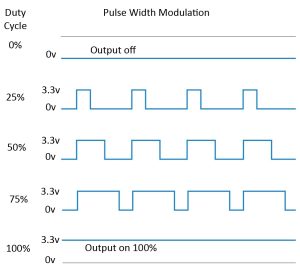
What is a pulse?
A pulse is a signal that briefly changes from its resting state to its active state and then back again.
On the ESP32, the resting state is 0 V (LOW) and the active state is 3.3 V (HIGH). A pulse is the moment the pin goes HIGH and then returns to LOW.
Two numbers describe a pulse completely:Width (or duration) — how long it stays HIGH, measured in microseconds (µs) or milliseconds (ms)
Period — how long from the start of one pulse to the start of the next
Frequency is just the period turned upside down: how many pulses per second. A period of 20 ms means 50 pulses per second (50 Hz).
Duty cycle is width ÷ period, as a percentage. A 1 ms pulse every 20 ms is a 5% duty cycle.
Two completely different uses for pulses
This is the key idea. Pulses do two separate jobs on E-32, and confusing them is the most common source of confusion.
Use 1 — Pulses as information
Here the exact width matters. The width is the message.
| Where on E-32 | What the width means |
|---|---|
| Trig pin (ultrasonic) | A 10 µs pulse = “fire a sound burst now” |
| Echo pin (ultrasonic) | The pulse stays HIGH for the whole round trip — its width is the distance |
| Servo signal | 1.0 ms = 0°, 1.5 ms = 90°, 2.0 ms = 180° |
In these cases the ESP32 isn’t averaging anything — it’s measuring or generating an exact duration. Timing is the message.
Use 2 — Pulses as average power
Here the width doesn’t matter individually — only the proportion of time spent HIGH. The pulses come so fast that the device can’t respond to each one, so it feels the average.
| Where on E-32 | What the duty cycle means |
|---|---|
| Motor PWM | 50% duty = half speed, 100% = full speed |
| RGB LED brightness | 25% duty = dim, 100% = full brightness |
Switch a motor on and off 1,000 times a second and its inertia smooths the pulses into a steady half-power spin. Your eye does the same with an LED. This is PWM — Pulse-Width Modulation — and it’s how a pin that can only do 0 V or 3.3 V pretends to output 1.6 V.
Why pulses instead of steady voltages?
Three reasons, and they’re all practical:
Digital pins can only do two things. A GPIO is either 0 V or 3.3 V — there’s no “1.6 V” setting. Pulses let you encode an in-between value in time instead of voltage.
Time is what the ESP32 measures best. Its clock ticks at 240 MHz — it can time an event to a few nanoseconds. Measuring a voltage precisely is harder; measuring a duration is trivial.
Switches waste almost no power. A transistor that’s fully ON or fully OFF dissipates very little heat. One that’s half-on (like a resistor dimming a light) wastes the rest as heat. Pulses keep the switches in their efficient states.
The one-sentence summary
A pulse is a brief HIGH. Its exact width can carry information (distance, angle), and the proportion of time it’s HIGH can control average power (speed, brightness).
Quick Check
What two numbers fully describe a repeating pulse?
The Echo pin stays HIGH for 1160 µs. Is this pulse as information or pulse as average power?
A motor runs at 50% duty cycle. What does it do — run at half speed, or stop and start noticeably? Why?
Why is it easier for the ESP32 to measure time than voltage?
A servo gets a 1.5 ms pulse every 20 ms. What angle does it move to, and what is the duty cycle?
The LED
Big idea: An LED (Light-Emitting Diode) produces light when electricity flows through it in one direction only. Inside, electrons and “holes” meet and release their extra energy as photons — and the size of that energy drop decides the colour.
1. What is an LED?
An LED is an electronic component that produces light when current flows through it the right way round. The “D” stands for diode — a one-way valve for electricity. Connect it backwards and no current flows (and no light).
It has two legs:
Anode (longer leg, +) — current enters here
Cathode (shorter leg, −) — current leaves here
2. How Does It Produce Light?
Inside the LED is a semiconductor chip — a material that is neither a good conductor (like copper) nor a good insulator (like rubber). It only conducts under certain conditions.
The chip is a sandwich of two layers:
n-type layer — packed with extra electrons
p-type layer — full of “holes” (empty spots that want electrons)
When we apply a forward voltage, the electrons and holes rush toward the junction between the layers and recombine. When an electron drops into a hole, it falls to a lower energy state and releases the extra energy as a photon (a particle of light).
Analogy — the waterslide: Electrons are excited kids at the top of a waterslide (the n-side). Holes are empty spots in the pool below (the p-side). The barrier stops them — until we connect the battery the right way, which opens the gate. The kids slide down and splash into the pool, and the splash is a burst of light. Connect the battery backwards and the gate stays shut — no splash, no light.
Holes: A hole isn’t a real particle — it’s an empty seat. Imagine a full row of seats with one gap: when someone moves into the gap, the empty seat appears to move backwards. That’s how holes “move” — by electrons shifting into them. Electrons drift as free particles. Holes “move” only as a chain of electrons filling vacancies — a wave of state-change, not travelling objects.
3. Why Different Colours?
The colour depends on the semiconductor material used, which sets the size of the energy gap:
Bigger energy drop → higher-energy photon → shorter wavelength → blue/violet
Smaller energy drop → lower-energy photon → longer wavelength → red
In the waterslide analogy: a taller slide makes a bigger, bluer splash; a shorter slide makes a smaller, redder splash.
| Colour | Typical forward voltage |
|---|---|
| Red | ~1.8–2.2 V |
| Green | ~2.2–3.2 V |
| Blue / White | ~3.0–3.4 V |
4. Using an LED Safely
Polarity matters — long leg (anode) to positive, short leg (cathode) to negative/ground.
Always use a resistor in series. An LED has almost no resistance of its own — without a resistor, too much current flows and it burns out instantly. Use Ohm’s Law from Lesson 1 to choose the right value.
E-32 runs at 3.3 V. Red LEDs (~1.8 V) need roughly a 100–150 Ω resistor; blue LEDs (~3 V) need around 100 Ω. We’ll calculate exact values together.
5. Quick Check
What do the letters in LED stand for, and what does the “D” tell us about how it behaves?
What are the two layers inside the LED, and what does each contain?
What is released when an electron recombines with a hole?
Which colour has the bigger energy gap — red or blue?
Why does an LED need a resistor?
The Ultrasonic Sensor
Big idea: The HC-SR04 measures distance by shouting and listening for the echo. It fires a burst of ultrasound, times how long the echo takes to return, and uses the speed of sound to calculate distance. It’s a bat’s eye — a cone, not a laser.
1. How It Works
Send — a short burst of ultrasonic sound (too high-pitched for humans to hear).
Bounce — the sound reflects off whatever is in front and travels back.
Listen — the sensor detects the returning echo.
Time — it measures the round trip in microseconds.
Calculate — sound travels at 343 m/s in air, so:
Distance=round-trip time×speed of sound2Distance=2round-trip time×speed of sound
We divide by 2 because the sound travelled there and back.
The shortcut: sound covers 1 cm in about 29 µs. Round trip is 58 µs per cm, so:
Distance (cm)=time (µs)58Distance (cm)=58time (µs)
Fast echo → close object. Slow echo → far object.
Specs: range 2 cm – 400 cm, resolution ~3 mm, beam angle about 15°.
⚠️ Beam angle matters. The HC-SR04 doesn’t point — it sprays. At 2 m it’s “seeing” a cone roughly 50 cm wide. It can miss thin poles and will happily detect a wall slightly off to the side. For obstacle avoidance this is usually a feature, but it explains odd readings.
2. The Four Pins
| Pin | Role | What it does |
|---|---|---|
| VCC | Power | Supplies the sensor. Needs 5 V for reliable ranging. |
| GND | Ground | The return path — completes the circuit. |
| Trig | Trigger | The “go!” button. E-32 holds it HIGH for 10 µs → sensor fires a burst. |
| Echo | Echo | Goes HIGH while the sound is travelling, LOW when it returns. The duration of that HIGH pulse is the round-trip time. |
3. Wiring to the ESP32 — Read This Carefully
The HC-SR04 is a 5 V device. The ESP32 is a 3.3 V device. Wiring it directly will work for a while and then kill a GPIO pin. You need a voltage divider on the Echo line.
| HC-SR04 | Goes to |
|---|---|
| VCC | ESP32 5 V / VIN pin (only live when USB is connected) |
| GND | ESP32 GND |
| Trig | Any output GPIO (e.g. GPIO 5) — a 3.3 V HIGH is enough to trigger it |
| Echo | Through a 1 kΩ + 2 kΩ divider → GPIO 18 |
The divider: Echo → 1 kΩ → junction → 2 kΩ → GND. Take the signal from the junction. A 5 V pulse becomes ~3.3 V, which the ESP32 tolerates.
Rule: The ESP32 can listen to 5 V devices, but only through a divider. It can never be fed 5 V directly.
4. When It Lies to You
The HC-SR04 is reliable, but not honest. Expect bad readings from:
| Situation | What happens |
|---|---|
| Soft surfaces — fabric, foam, curtains | Sound is absorbed, no echo comes back |
| Angled surfaces | Sound deflects away instead of back → a wild or missing number |
| Very close objects (< 2 cm) | Outside minimum range → garbage |
| Thin objects | Sound passes either side of the cone → missed entirely |
| Two sensors running together | They hear each other’s echoes → nonsense |
For your obstacle-avoidance project: never trust a single reading. Check repeatedly before making a decision — one wild spike is common, and a robot that flinches at every bad number will freeze in a corner.
5. Quick Check
Why do we divide the round-trip time by 2?
What does the Echo pin output — a voltage level, or a timed pulse?
Why does the Echo line need a voltage divider on the ESP32?
E-32 measures a round trip of 1160 µs. Roughly how far away is the object?
Why might a curtain be invisible to the sensor?
Why does the 15° beam angle make the sensor better at noticing things and worse at aiming at them?
Key Terms
| Term | Meaning |
|---|---|
| Ultrasonic | Sound above human hearing (> 20 kHz) |
| HC-SR04 | The 4-pin ultrasonic distance sensor used on E-32 |
| Trig | Input pin that fires a sound burst |
| Echo | Output pin whose HIGH duration = round-trip time |
| Voltage divider | Two resistors that scale a 5 V signal down to 3.3 V |
| Beam angle | The cone width the sensor can “see” (~15°) |
| Round trip | The sound’s journey to the object and back |
Actuators — Motors and Servos
Big idea: Actuators are the muscles of a robot — they turn electricity into movement. E-32 uses two kinds: DC motors that spin continuously (for wheels) and a servo that turns to an exact angle and holds it (for the head). Neither can be connected directly to the ESP32 — both need help.
1. Two Kinds of Muscle
| DC motor | Servo motor | |
|---|---|---|
| What it does | Spins continuously, fast | Turns to an exact angle, then holds |
| Range | Unlimited rotation | Usually 0°–180° |
| Knows its position? | No | Yes — that’s the whole point |
| Used on E-32 for | Wheels / drive | Head (sensor aiming) |
| Control | Voltage (speed) + polarity (direction) | A timed pulse (angle) |
The difference in one line: a DC motor doesn’t know where it is; a servo always does.
2. DC Motors
Give a DC motor power and it spins. That’s it. Swap the two wires and it spins the other way. It has no idea how far it has turned, and it keeps spinning until you cut the power.
Our motor: the TT geared motor. This is the classic yellow-box gear motor used in almost every small robot chassis — including E-32’s. It’s a small brushed DC motor with a plastic gearbox built into a yellow housing, and it usually has a dual shaft (one on each side) so a wheel can be fitted to either end.
The gearbox trades the motor’s naturally very high speed for torque (twisting strength) at a slower, more useful speed. A bare motor spins too fast to drive a robot — the gears make it usable.
Two ratings that matter:
Voltage — 6 V. This is what it was designed for. Less and it runs slowly (too little and it won’t start). More and it runs faster but overheats and the plastic gears wear out.
Speed — 100 RPM at 6 V. With nothing attached, it completes 100 revolutions per minute. Under load it will be slower — that’s normal and expected.
Why a gearbox? A bare motor might spin at 10,000 RPM with almost no strength — useless for driving a robot. Gears trade speed for torque. Slower, stronger, controllable.
A word on the TT motor’s honesty: it is cheap, plentiful, and good enough for teaching — but it is not precise. Two “identical” TT motors will spin at slightly different speeds, and that mismatch is why E-32 will drift left or right when you tell it to go straight. The fix is in software: trim one motor’s PWM value until the robot drives straight. That is a real engineering lesson, not a workaround.
3. Why You Cannot Connect a Motor to a Pin
This is the most important practical point in the lesson.
An ESP32 GPIO pin can supply roughly 12–40 mA. A TT motor under load draws 150–250 mA just spinning freely, and well over 1 A when it stalls (jammed against something). Connect it directly and you will destroy the pin — or the whole board.
There’s a second problem: a motor is a coil. When you cut power to a coil, it generates a voltage spike in reverse (back-EMF) that can be many times the supply voltage. That spike travels straight back into whatever is driving it.
The solution: a motor driver. A chip with an H-bridge — four electronic switches arranged so current can be pushed through the motor in either direction, from a separate power supply, controlled by low-current signals from the ESP32.
| ESP32 pin | Goes to | Purpose |
|---|---|---|
| Two GPIO pins | Driver inputs | Direction — which way current flows |
| One GPIO pin | Driver PWM input | Speed — how much power |
| Separate battery | Driver power input | The muscle — never the ESP32’s 3.3 V |
The driver does the heavy lifting; the ESP32 just gives instructions.
Direction is not “forward/backward” — it’s “which way current flows.” Reversing a motor by swapping wires on a battery is the same thing an H-bridge does electronically.
4. Speed Control — PWM
You can’t control a motor’s speed with a resistor — you’d just burn power as heat and the motor would stall.
Instead we use PWM (Pulse-Width Modulation): switching the power on and off very rapidly and varying the proportion of time it’s on — the duty cycle.
| Duty cycle | Average power | Motor behaviour |
|---|---|---|
| 0% | 0 V | Stopped |
| 25% | ~1.5 V equivalent | Slow |
| 50% | ~3 V equivalent | Half speed |
| 100% | 6 V | Full speed |
The switching happens thousands of times per second — far faster than the motor can react. Its inertia smooths the pulses into a steady spin.
Two things to know about TT motors and low duty cycles: below roughly 20–30% duty, the motor may not have enough torque to overcome friction and will just buzz without turning. And because the two motors are never perfectly matched, the same duty cycle on both will produce slightly different speeds. Both are practical details you’ll meet when E-32 first drives.
Same idea, different use: PWM is how we’ll also dim the RGB LED. The technique is identical — only the frequency and what’s being driven change.
5. Servo Motors
A servo is not a different kind of motor — it’s a small DC motor plus three extra things:
A gearbox — for strength
A potentiometer — a variable resistor that reports the output shaft’s current angle
A control chip — reads the potentiometer, compares it to the commanded angle, and drives the motor until they match
That last part is a feedback loop, and it’s why a servo holds its position even when you push on it. It never stops correcting.
Three wires:
| Wire | Colour (typical) | Purpose |
|---|---|---|
| Power | Red | +5 V to +6 V — not the ESP32’s 3.3 V pin |
| Ground | Brown / Black | Return path — must share ground with the ESP32 |
| Signal | Orange / Yellow / White | The command pulse |
How the command works: the ESP32 sends a pulse every 20 ms (50 Hz). The width of that pulse sets the angle:
| Pulse width | Angle |
|---|---|
| 1.0 ms | 0° |
| 1.5 ms | 90° (centre) |
| 2.0 ms | 180° |
So “move to 90°” literally means “send a 1.5 ms pulse, then keep sending it.” Stop sending and the servo goes limp.
A 3.3 V signal is fine here. Most hobby servos read a 3.3 V logic HIGH correctly — it’s the power wire that needs 5–6 V, not the signal.
6. E-32’s Servo — the SG90S
A tiny, cheap, 9 g servo used for E-32’s head. “SG” = small gear; “90” = its original 9 g weight.
Torque: rated ~1.8 kg·cm at 6 V (stall). That means it can hold 1.8 kg at 1 cm from the shaft — or 0.18 kg at 10 cm. Torque falls off with distance, so a long arm multiplies the load.
Stall torque is the maximum before it gives up — the point where it’s straining and getting hot. Running torque is lower. Design to use well under the stall figure.
Honest limitations:
These are cheap and they fail. Gears strip, electronics overheat, manufacturing varies.
They draw current spikes when starting or straining — up to an amp briefly.
They buzz and twitch at rest, because the feedback loop is always correcting.
⚠️ The brownout trap: a servo current spike on a shared supply can drop the voltage enough to reset the ESP32 mid-program. E-32’s head is light, so we’re fine — but this is why robots “randomly restart” and it’s worth knowing the cause.
7. Power and Ground — the Rules
Motors and servos never run from the ESP32’s 3.3 V pin. Separate battery, or the 5 V/VIN pin only if the supply can deliver the current.
All grounds must be connected together. The ESP32, the motor driver and the servo must share a common ground — otherwise the control signals have no reference and nothing works reliably.
Add a capacitor across the motor supply (typically 100–470 µF) to absorb current spikes before they reach the electronics.
Check your driver’s current rating against the motor’s stall current. The TT motor can pull over 1 A per motor when stalled — a driver that’s too small overheats and fails.
Battery voltage sags under load. A 6 V pack might read 6.4 V at rest and drop to 5.5 V when both motors are running. This is why the robot’s top speed is lower than the maths suggests.